Record what matters
Pick a display, a window or any area. Arvelle captures it without the cursor and remembers every move, click and keystroke on the side.
 Arvelle
Arvelle records your Windows screen and handles the hard parts for you. Zooms follow your cursor, the pointer glides instead of jitters and every frame sits on a beautiful background.
Windows 10 and 11, 64-bit
Pick a display, a window or any area. Arvelle captures it without the cursor and remembers every move, click and keystroke on the side.
Your take lands on a wallpaper with padding, soft corners and a natural shadow. Nothing is baked in, so you can change all of it later.
Arvelle reads your clicks and typing, moves in close where the action is and glides back out when you're done. The cursor stays silky the whole way.
Add your webcam and keycaps if you like, then export MP4 up to 4K or a GIF. Same window, no second app.
One take, four looks. Every clip on this page was recorded and edited with Arvelle.
Wallpapers, gradients, colours or your own image, with padding, soft corners and a natural shadow.
Switch to vertical, square or portrait and the zooms re-aim themselves for the new shape.
Pick a cursor style and size, add click ripples and let it hide itself when it stops moving.
Your webcam as a circle or rounded square in any corner, shrinking out of the way while you zoom.
Trim, cut and speed up on a timeline made for screen recordings. Every zoom is a block you can drag, stretch or remove.
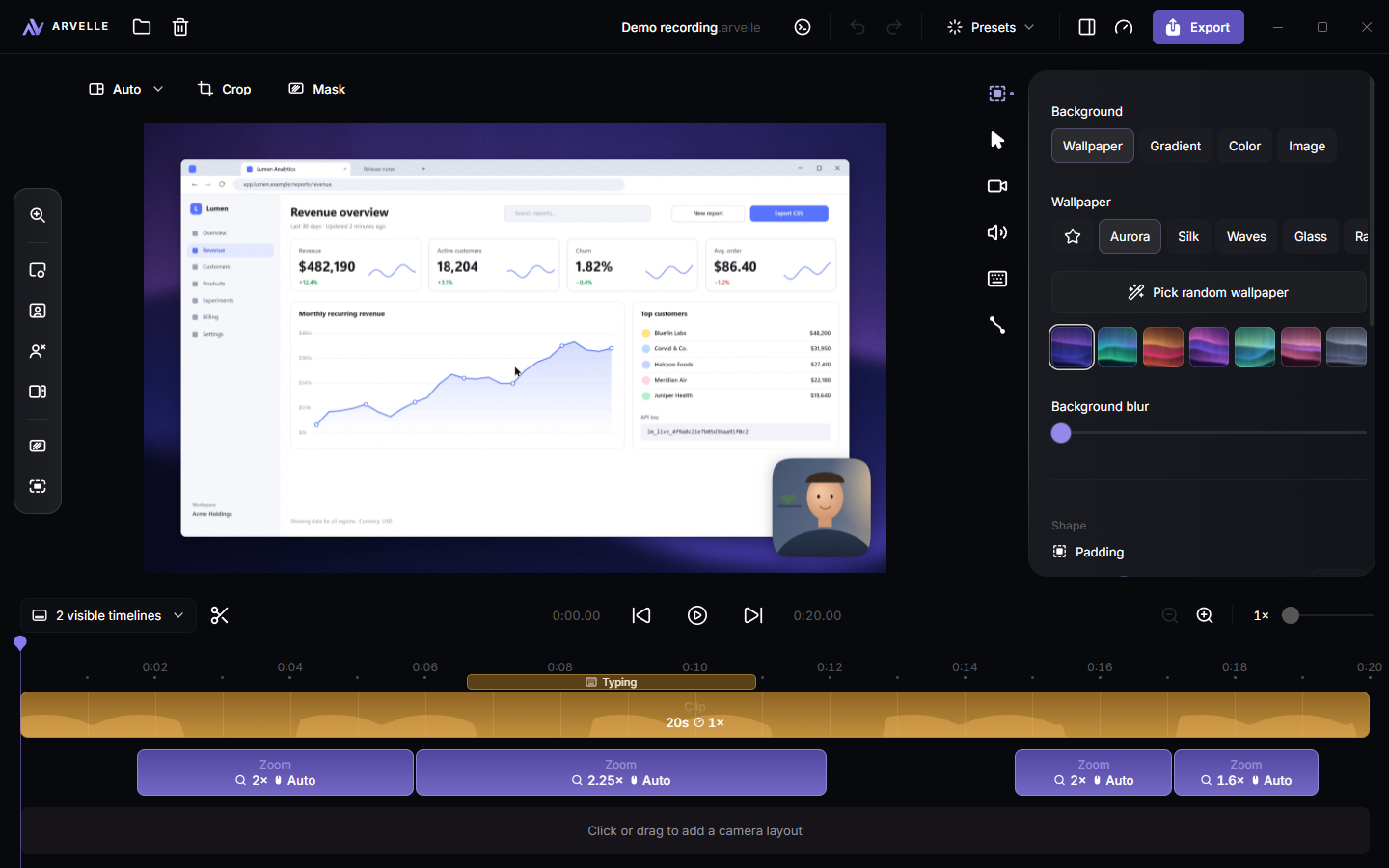
Press C to split at the playhead and X to remove everything back to the last cut. Trimmed parts stay one click away.
Arvelle spots long stretches of typing and offers to fast forward them, with the sound kept natural.
Every change is reversible and projects save themselves, so trying an idea never costs you the last one.
Export MP4 in up to 4K at 60 frames per second, or a GIF for docs and chats. Or copy the finished video to your clipboard and paste it straight into Slack, Teams or an email.
Recording uses your graphics card's hardware encoder on AMD, NVIDIA and Intel, so even 4K at 60 fps leaves room for the app you're showing.
Arvelle records the window itself through Windows Graphics Capture. Pop-ups and other windows on top never end up in the video.
The toolbar, the countdown and the recording controls are invisible to the capture, so you can see them and your viewers can't.
Recording, editing and exporting all happen on your PC, and nothing you record is ever uploaded. Anonymous usage statistics are only sent if you switch them on.
Windows 11 and Windows 10 version 1903 or newer, 64-bit. Arvelle works with any number of displays, including different scaling per display.
No. Recording is handled by the hardware encoder in your graphics card, so a typical laptop records 1080p at 60 fps without breaking a sweat. Exports are faster on a dedicated GPU.
Yes. Pick a camera and a microphone in the recording bar and switch system audio on with one click. Each is saved as its own track, so you can adjust or mute them afterwards.
Always. Automatic zooms are just a starting point. Move them, change how close they go, pin one to a fixed spot or remove them, all on the timeline.
Never your recordings. They stay in your Videos folder, or wherever you point Arvelle. The app only checks for updates, verifies your licence key now and then, and sends anonymous usage statistics if you choose to share them.
Recording and editing are free. Exporting needs a licence key, which you enter once in the app. It keeps working offline for two weeks between checks.
MP4 in 720p, 1080p, 1440p or 4K at up to 60 fps, and GIF up to 1080p. Pick a quality preset for editing, social media or the web, or copy the result to your clipboard.
Record it once with Arvelle and let the polish take care of itself.